
In short
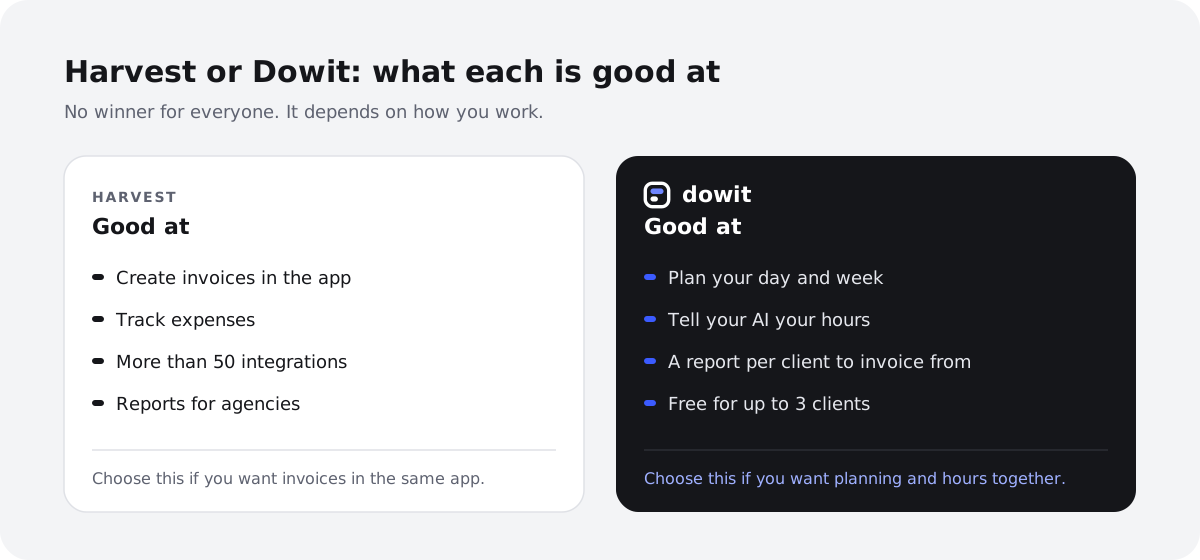
- Harvest is a strong time tracker with invoices, expenses and lots of integrations. If you want to create invoices in the same app as your hours, Harvest is good at that.
- Dowit is a work planner: your calendar, tasks, projects and hours in one place, run in plain language with Claude or ChatGPT.
- The biggest difference: in Dowit you also plan your work, and you just tell your AI your hours ("1h Acme, 30m Northwind"). Dowit doesn't create invoices; it shows what to invoice per client.
- Harvest's free plan is for 1 user and 2 projects; Dowit's is for up to 3 clients, with unlimited projects.
Harvest has been around for a long time, and many freelancers and agencies use it to track hours and invoice. You start a timer, and at the end of the month you turn your hours into an invoice.
Still, freelancers often look for something else. They don't just want to count what they did, but also plan what they'll do, or they already work with Claude or ChatGPT all day and want to simply say their hours. This guide puts Harvest and Dowit side by side, honestly.
What's the difference between Harvest and Dowit?
Harvest is built to track time and expenses and turn them into invoices. For planning people and capacity there's a separate app, Harvest Forecast.
Dowit is a work planner for freelancers and small agencies. Your calendar, tasks, projects and hours live in one place, and you run it with Claude or ChatGPT: "block two hours tomorrow for the Acme proposal", "1h Acme, 30m Northwind", "what do I still need to invoice?". Or you do it yourself in the app.
| Harvest | Dowit | |
|---|---|---|
| Time tracking | Yes, with a timer | Yes, with a timer or afterwards in one sentence |
| Create invoices | Yes, in the app | No, but a report per client to invoice from (PDF, CSV, Excel), in Pro |
| Expenses | Yes | No |
| Plan your day and week | Through the separate app Harvest Forecast | Yes, with your calendar and task list |
| Works with Claude or ChatGPT | No AI mentioned on the pricing page | Yes, through MCP, and listed in the Claude connector directory |
| Free plan | Yes, 1 user and 2 projects | Yes, up to 3 clients |
| Paid plan | $11 per user per month, or $9 per month billed yearly | $10 per user per month, or $100 per year (€9 / €90 excl. VAT in Europe) |
Harvest details from their pricing page on 12 November 2026. Check current plans and prices at getharvest.com.
Where is Harvest better?
- Invoices and expenses. Harvest creates your invoices and tracks your expenses. Dowit only shows what to invoice; you create the invoice itself in your accounting tool.
- Integrations. Harvest lists more than 50 integrations, and in the paid plan also accounting and payment tools.
- Teams and reports. For larger teams, Harvest offers reports on capacity, utilization and profitability, and timesheet approval.
- Apps. Harvest has apps for Mac and iOS.
Where is Dowit different?
Planning and hours in one place
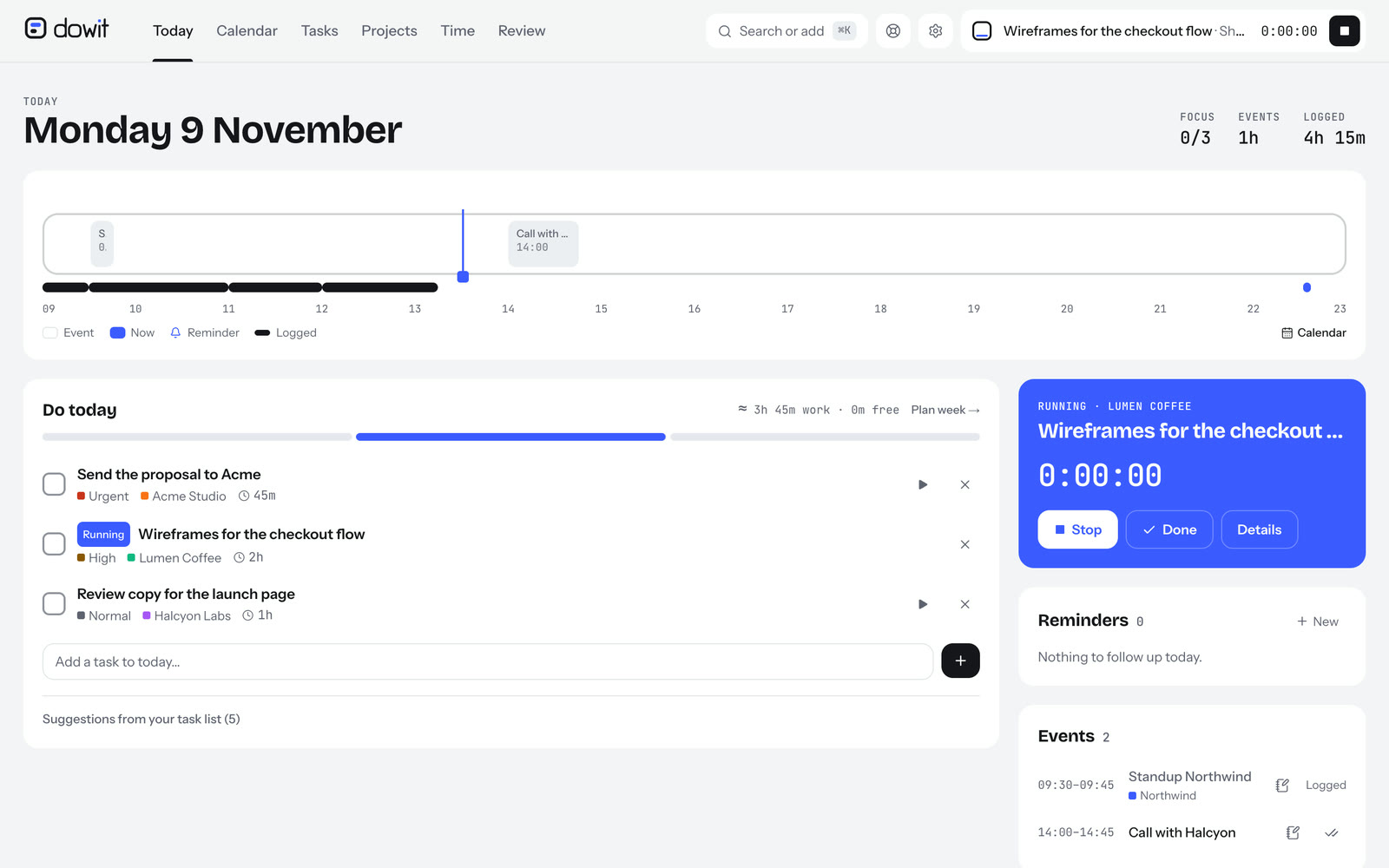
In Harvest you record what you did. In Dowit you also plan what you'll do: your tasks with due dates and priorities, your events from Google Calendar, and work blocks in your week. Your hours belong to the same clients and projects, so your planning and your invoicing never drift apart.
Your hours in one sentence
No need to start a timer or fill in forms. At the end of the day you tell Claude or ChatGPT: "1h Acme, 30m Northwind, and 2 hours on the Lumen Coffee proposal." Dowit places your hours back to back in your working day, against the right client and project.
Knowing what to invoice
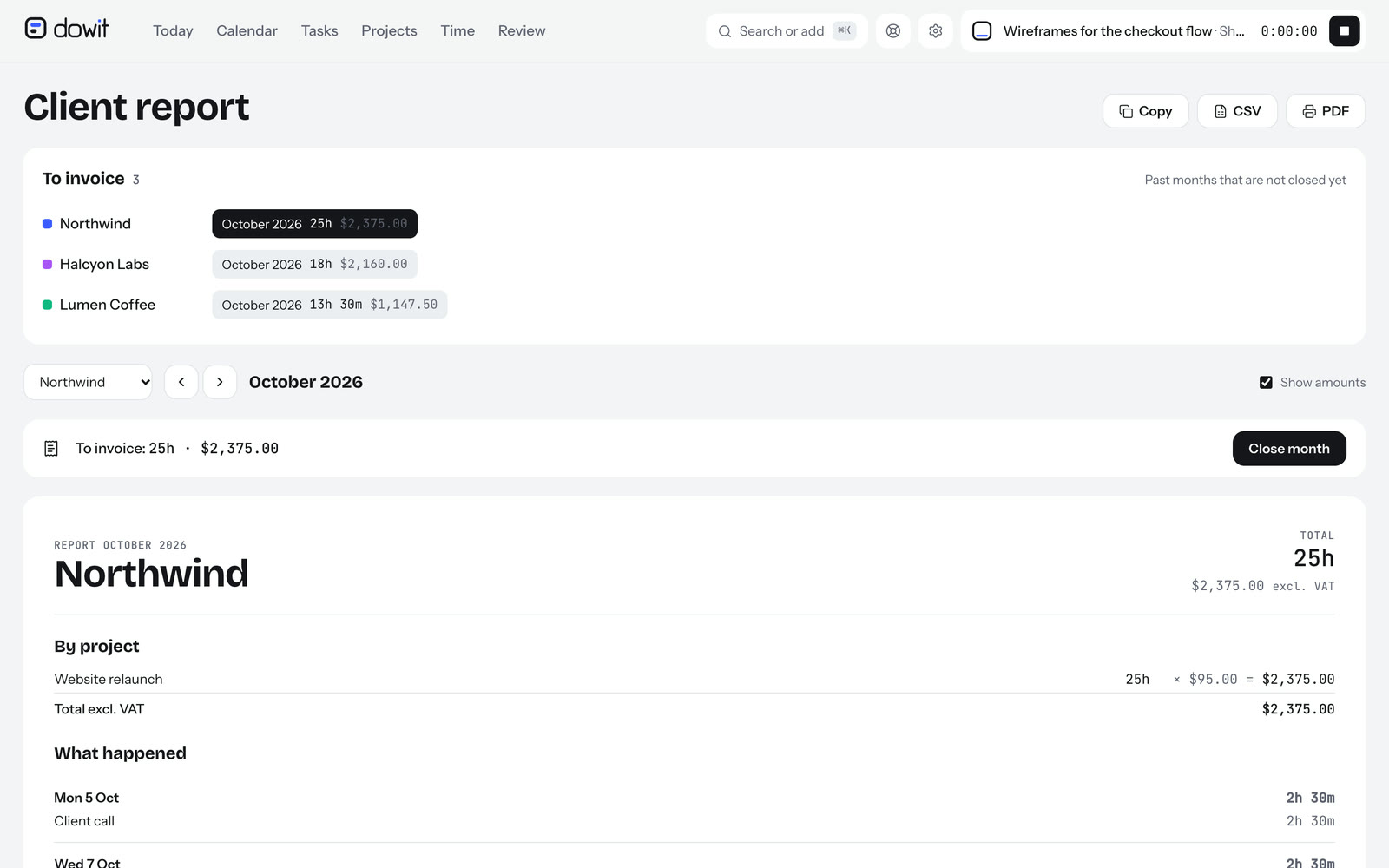
At the end of the month you ask "what do I still need to invoice?". You get your hours and the amount at your rate per client, as a report, PDF, CSV or Excel for your own invoicing tool. Once the invoice is sent, you close the month, so you never forget hours or bill them twice.
What does it cost?
- Harvest: free for 1 user and 2 projects. The Teams plan costs $11 per user per month, or $9 per month billed yearly, with a 30-day free trial. See getharvest.com/pricing.
- Dowit: free for up to 3 clients, with unlimited projects. Pro costs $10 per user per month (or $100 per year); in Europe €9 (or €90 per year) excl. VAT, with your first 14 days free. See pricing.
How do you switch from Harvest to Dowit?
- Export your hours from Harvest as a CSV file (Reports → Time → Detailed time → Export → CSV).
- Import them into Dowit under Settings → Import. Dowit recognises the Harvest format, with your clients, projects and hours.
- Connect your calendar under Settings → Calendar, and your AI under Settings → AI assistant.
- Set your rates per client or project, so the invoicing report shows the right amounts right away.
After importing, compare a few days or weeks with what you had in Harvest before you switch.
Frequently asked questions
Can I create invoices in Dowit?
No. Dowit shows per client and per month what to invoice, with hours and amounts, and you download it as PDF, CSV or Excel. You create the invoice itself in your accounting tool. If you want invoices in the same app as your hours, Harvest is a better fit.
Do I need Claude or ChatGPT?
Not necessarily. Dowit also works as a regular app, on your computer and phone, with a timer and ⌘K to add anything in one sentence. With your AI it's a lot faster, though.
Can I bring my hours from Harvest?
Yes, with a CSV export from Harvest that you import into Dowit under Settings → Import.
Who is Harvest a better choice for?
For people who want invoices and expenses in the same app as their hours, and for agencies that need reports on utilization and profitability.