
In short
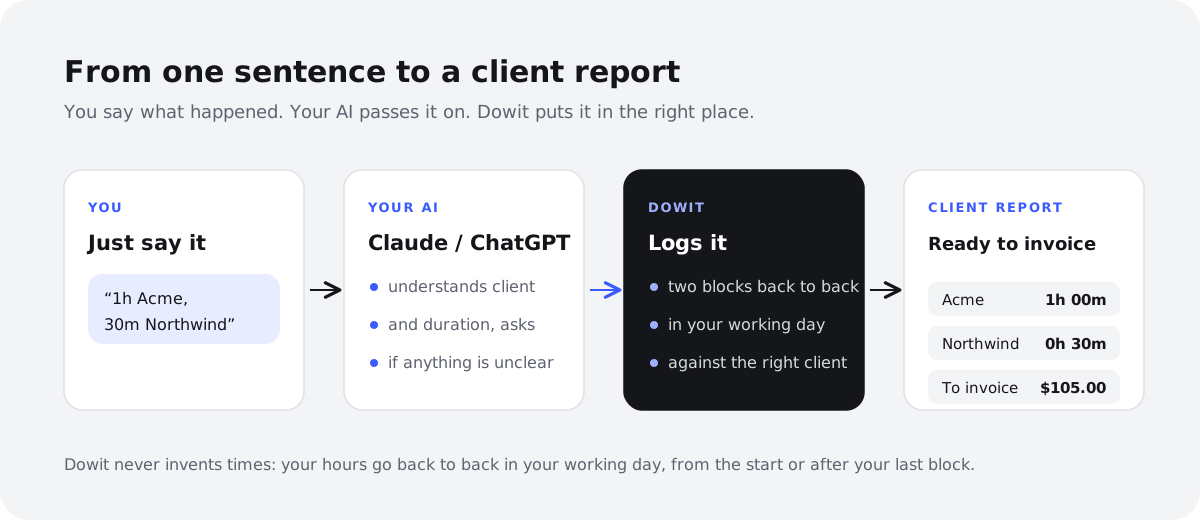
- You can track your time by simply telling Claude or ChatGPT what you worked on, for example "1h Acme, 30m Northwind".
- To make that stick, you connect your AI to a planner that actually stores the hours, such as Dowit, via MCP. The AI on its own can't keep a reliable record.
- Say it at the end of the day, in one sentence, with the client or project. For work you want to measure live, start a timer.
- At the end of the month, ask "what do I still need to invoice?" and you get a per-client overview to use in your own invoicing software.
Time tracking is the chore most freelancers mean to do and somehow never quite get round to. Every forgotten hour is money you don't bill, yet the stopwatch gets left off, and Friday afternoon turns into an archaeology dig through your inbox and calendar.
This guide shows a different approach: you tell your hours instead of typing them. You talk to the AI you already use, Claude or ChatGPT, and it writes them into a planner. We use Dowit as the example, but the method and the tips apply whatever tool you end up with.
Why does logging time afterwards in one sentence often beat a stopwatch?
A stopwatch is precise, provided you always remember to start and stop it. Real days don't work like that. You jump from a call to a quick client question to an email that can't wait, and the timer either runs on while you do something else or never gets started. Fixing it afterwards takes longer than the tracking itself.
Logging afterwards flips that around. At the end of the day you look back and sum it up: "2h Acme, 1h Lumen Coffee, 30m admin". It takes ten seconds, and because the day is still fresh, it's usually accurate enough to bill from.
An AI makes that summary even lighter. No form, no dropdown, no start and end times: you say it the way you'd tell a colleague, and the planner handles the rest.
A timer still earns its place for long stretches of deep work, or for clients who expect billing to the minute. The best setup is usually a mix: a timer for the big blocks, one sentence for everything else.
What do you need to track time with Claude or ChatGPT?
You need three things, and you probably have two of them already.
- An AI assistant that supports custom connectors. Claude and ChatGPT can talk to other apps through MCP (Model Context Protocol). Not every plan allows custom connectors, so check with your provider.
- A planner that actually stores your hours. A chat isn't a ledger. Your AI forgets details and can't build a dependable monthly report from scattered messages. Your hours need to live somewhere permanent, with the client, project and rate attached. In this guide, that's Dowit.
- A fixed habit. One moment each day when you log your time. Without it, no tool will save you.
Dowit has no built-in AI chat of its own; it works with the AI you already use. You can read more about how that fits together on the AI page.
How to track your time with your AI, step by step
Step 1: Create a free account and set up your clients and projects
Sign up at dowit.io. There's no password: you sign in with Google or with a link sent by email. It's free for individual use with no time limit (see pricing).
Next, add your clients and projects, with an hourly rate per client or per project. Rates use your workspace's currency, such as pounds, euros or dollars. Clear names help your AI recognise them: "Acme" and "Acme website" work far better than "Client A" and "Project 2".
Step 2: Connect Claude or ChatGPT
In Claude: open Settings → Connectors and choose "Add custom connector". Paste https://dowit.io/api/mcp, click Connect, sign in to Dowit and grant access.
In ChatGPT: open Settings → Apps & Connectors, switch on Developer mode and create a connector with the same address. Sign in and grant access.
Menu names may differ slightly depending on your version. Your AI only sees your own workspace, and you can disconnect at any time in Dowit under Settings → AI assistant. For a fuller walkthrough, see connecting Claude to your calendar with MCP.
Step 3: Log your hours in one sentence
First set your working hours, say 09:00 to 17:30. You can simply ask your AI: "Set my working hours to 9am to 5:30pm."
From then on, logging time is one sentence: "Log 2h Acme, 1h Lumen Coffee and 30m Northwind." Dowit places those blocks one after another in your working day, against the right client and at the right rate. You don't have to come up with start or end times.
If you want more context, say what you did as well: "1h30 Acme on the homepage copy, 45m Halcyon Labs call about the schedule." That description shows up later in your client report.
Step 4: Use the timer for work you want to measure live
For a long block, live tracking is the better fit. Say "Start the timer on the logo design for Lumen Coffee", then "Stop the timer" when you're done. The running timer also sits at the top of the app, so you can always see whether it's still going.
Get into the habit of glancing at it before you close your laptop. It saves you from the classic timer that ticks away all night.
Step 5: Check your week
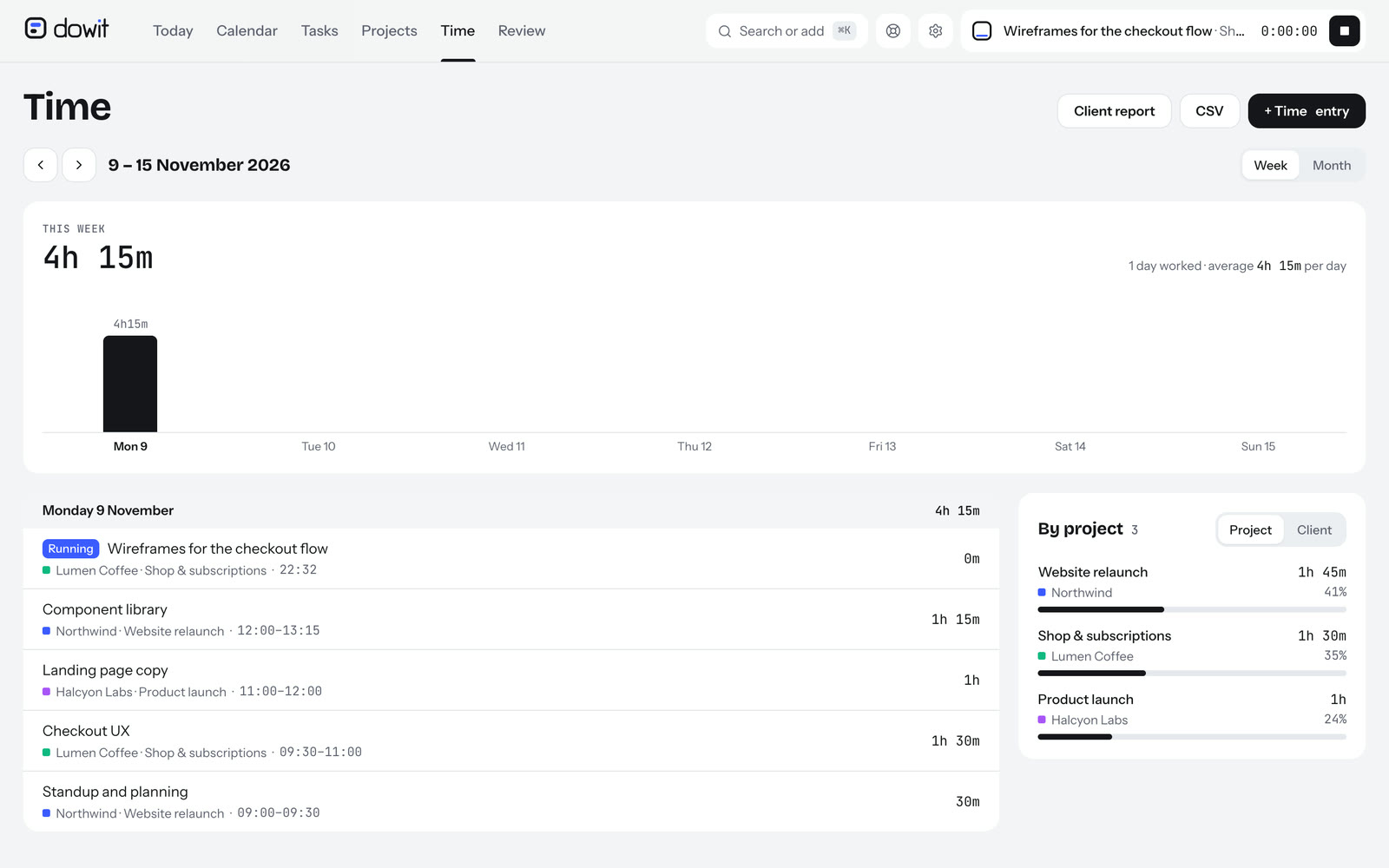
On Friday, or whenever you wrap up your week, ask: "How many hours did I work this week, per client?" Your AI pulls the time report from Dowit. In the app itself you'll find the same in the time overview, by week or month, by project or client.
This is where gaps become visible. Nothing on Wednesday, even though you were definitely working on Acme? Fill it in now. If you already do a weekly review, fold this into it; see the guide to the weekly review for freelancers.
Step 6: Get your monthly report and see what to invoice
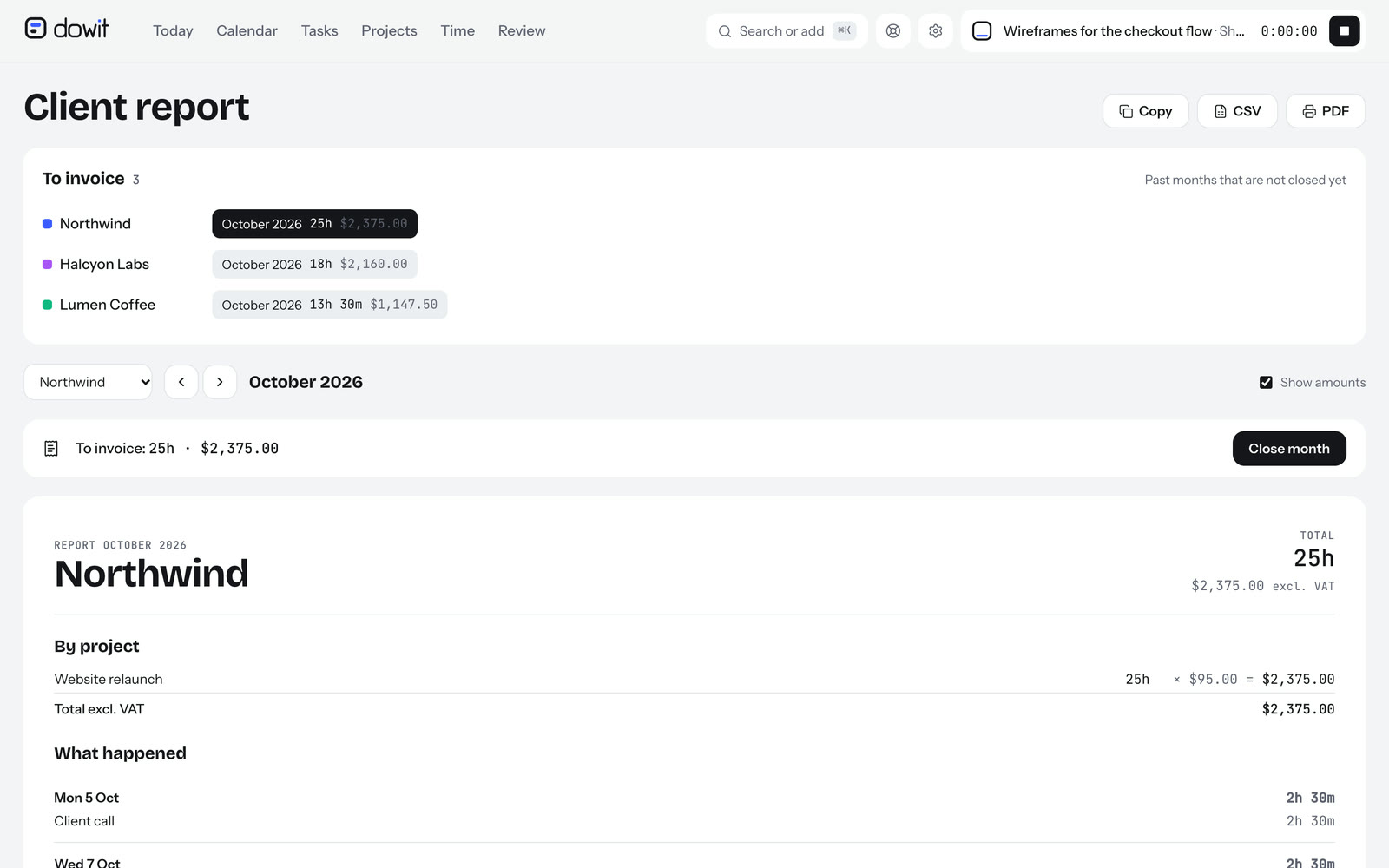
At the end of the month, ask: "What do I still need to invoice?" You see what's still open, per client and per month. Then request the monthly report for each client: "Give me the October report for Northwind."
That report shows hours per project, what you did each day, the tasks you completed and the amount excluding VAT. You can copy it as text, print it as a PDF or export it as a CSV. One important point: Dowit doesn't create invoices. You raise the invoice in your own invoicing software and use the report as the basis or as an attachment.
Once the invoice has gone out, say: "Close October for Northwind as invoiced." That month then drops off your list of open months. If you made a mistake, you can reopen it. For more on rates and billing, read how to bill by the hour.
Which phrases work well for logging time?
There are no commands to memorise. It does help to be specific, though: give the duration, the client or project, and ideally what you did. A few examples that work well:
| What you say | What happens |
|---|---|
| "Log 1h Acme, 30m Northwind" | Two blocks one after another in your working day, on Acme and Northwind |
| "2h15 Halcyon Labs on the onboarding flow" | One 2h15 block on Halcyon Labs, with that description |
| "Start the timer on the Lumen Coffee logo" | The timer runs on that task, also visible at the top of the app |
| "Stop the timer" | The timer stops and the time is recorded |
| "How many hours have I worked for Acme this week?" | A time report for Acme covering this week |
| "How many hours have gone into the Acme website project?" | A time report per project, handy next to its hour budget |
| "What do I still need to invoice?" | The list of clients and months that are still open |
| "Close October for Northwind as invoiced" | The month is marked as invoiced and leaves the open list |
Phrases that work less well are vague about the client or the duration. "I did a bit on that website this afternoon" leaves your AI guessing at both. A good AI will ask a follow-up question, but it's quicker to say it properly in the first place.
How do you keep your hours accurate when logging afterwards?
Logging after the fact is only reliable if you stick to a few habits. These apply to any kind of time tracking, with or without AI.
Log on the same day
The longer you wait, the more you guess. At the end of the day you still know that call ran to 45 minutes; by Friday it's "about an hour". Tie logging to a fixed moment, such as closing your laptop.
Round consistently
Pick one rounding rule and stick to it, for example to the nearest quarter of an hour. Don't round up one day and down the next depending on your mood. Ideally, agree the rule with your client too, so there's nothing to argue about later.
Write descriptions your client understands
"Bugfix" tells your client very little. "Fixed the error in the contact form" tells them what they're paying for. Because your descriptions end up in the monthly report, you're really writing them for your client, not for yourself, and that saves questions when the invoice lands.
Split by client and project
Don't lump everything together. If you work on two Acme projects at different rates, say which one. That keeps the amount right and shows whether a project is staying within its hour budget.
What can't your AI do, and what should you watch out for?
An AI that logs your hours is useful, but it isn't magic. A few honest caveats:
- Your AI doesn't make up times. When you say "1h Acme, 30m Northwind", Dowit places those blocks one after another in your working day. It has no way of knowing you actually did Northwind at 4pm. For billing that rarely matters, as the duration is what counts. If the exact time matters to you, use the timer.
- Your AI can get a name wrong. With two clients whose names are similar, it might pick the wrong one. Clear names help, and a quick look at your weekly overview catches it.
- You remain responsible. Whatever goes on an invoice, check it yourself. Review the monthly report before you send it to a client or close the month.
- No suitable AI plan, no connection. If your AI doesn't support custom connectors, you can still use Dowit directly in the app: a timer on a task, or hours entered afterwards.
On privacy: your AI only sees your own workspace, and Dowit doesn't train any AI on your data. You can read how your data is kept separate on the security page.
Frequently asked questions
Can ChatGPT or Claude track my hours on their own?
Not reliably. A chat isn't a database: details get lost and you can't get a correct monthly report out of it. Connect your AI to a planner that stores your hours, such as Dowit, so the AI only has to pass things on.
Do I still need to give start and end times?
No. You give the duration and the client or project, and Dowit places the blocks one after another in your working day. If you want to know to the minute when you worked on something, use the timer.
Does Dowit create my invoices too?
No. Dowit produces a monthly report per client with hours, descriptions and the amount excluding VAT. You copy it as text, PDF or CSV into your own invoicing software, where you create the invoice.
How much does it cost?
Dowit is free for individual use, with no time limit. If you work as a team, you need the Business plan, which you can try free for 14 days. For the connection you do need a Claude or ChatGPT plan that allows custom connectors.
Can I bring my old hours with me?
Yes. You can import hours from Toggl or from any other CSV file. And you can always export your hours as a CSV too.
Does this work on my phone?
Yes. Dowit is a web app you can install on your phone, so you can log hours or start a timer on the go. Whether you can use your connector in the Claude or ChatGPT mobile app depends on your AI provider.