
In short
- Hourly billing works best when the scope of the work is hard to pin down up front: ongoing retainers, support and advisory work.
- Work out your hourly rate as (target income + business costs) ÷ the hours you can genuinely bill.
- Track time as you work rather than reconstructing it from memory, and agree on rounding in advance.
- Send a monthly timesheet with every invoice, broken down by project and by day. It heads off questions and late payments.
- Close each month once the invoice has gone out, so hours are never forgotten or billed twice.
Billing by the hour sounds simple: add up the hours, multiply by your rate, done. In practice it tends to go wrong in the details. Hours you never wrote down, a rate that turns out to be too low, or a client asking where those 14 hours of "meetings" came from.
This guide walks through the whole process: when an hourly rate is the right choice, how to calculate one, how to track and report your time, and how to close each month with no loose ends.
When should you bill by the hour rather than a fixed price?
Hourly and fixed-price billing are both sound models, but they suit different kinds of work. As a rule of thumb, the better you can estimate the scope of a job up front, the more a fixed price pays off. The less certain the work, the fairer an hourly rate is, for you and for your client.
| Hourly | Fixed price | |
|---|---|---|
| Suits | Ongoing work, support, advice, jobs of varying size | Well-defined projects with a clear deliverable |
| Who carries the overrun risk | The client | You |
| What your client needs | Trust and a clear timesheet | A clear quote and scope |
| What you need | Discipline in tracking time | Good estimates and agreements on extra work |
| Working faster gets you | More free time, not more revenue | A better margin |
| Typical example | Monthly support for Acme | A new website for Lumen Coffee |
Plenty of freelancers mix the two: a fixed price for the project itself, and an hourly rate for anything outside it, such as extra changes, maintenance or follow-up advice. Even on fixed-price work it pays to track your hours. Afterwards you can see whether your estimate held up, and your next quote gets sharper.
How do you calculate your hourly rate as a freelancer?
An hourly rate isn't a number you pick because it sounds about right. It follows from three things: what you want to earn, what your business costs to run, and how many hours you can actually bill. That last one is almost always overestimated.
The formula
Hourly rate = (target annual income + annual business costs) ÷ billable hours per year
Billable hours are the hours you can charge to a client. Admin, finding new work, writing proposals, training, holidays and sick days don't count. For many freelancers that leaves somewhere between half and two thirds of their working hours.
A worked example
The figures below are purely illustrative. Your own numbers depend on your situation, your country and your field. The example uses dollars, but the maths is the same in any currency.
| Item | Example |
|---|---|
| Target annual income (before tax) | $60,000 |
| Annual business costs (software, equipment, insurance, training, workspace) | $10,000 |
| Total you need to earn | $70,000 |
| Working weeks per year (after holidays, public holidays, sick days) | 45 |
| Billable hours per week | 24 |
| Billable hours per year | 1,080 |
| Hourly rate (70,000 ÷ 1,080) | ≈ $64.81, rounded to $65 excl. tax |
One important caveat: this example ignores the tax rules, social contributions and VAT or sales tax that apply where you live. Have your calculation checked by an accountant before you settle on a rate. Quote your rate excluding VAT or sales tax, and say so clearly in your proposals.
Then compare the result with what's typical in your field. If your calculated rate is well below the going rate, you're probably leaving money on the table. If it's well above, check whether your costs and billable hours are realistic.
One rate per client or per project?
A single rate for everything is the simplest option. Still, there are good reasons to vary it:
- Per client: a regular client with plenty of volume might get a slightly lower rate, a small client who needs a lot of back-and-forth a higher one.
- Per project: strategic advice or rush work deserves a higher rate than routine maintenance for the same client.
If you work with several rates, record them in your time tracking rather than keeping them in your head. Otherwise you'll end up applying the wrong one at month-end.
How should you handle rounding and minimum units?
Nearly every freelancer rounds. The questions are how, and whether your client knows. Pick one method and be upfront about it in your proposal or engagement letter.
Common choices:
- 15-minute increments: simple and easy to read. A 7-minute phone call becomes a quarter of an hour.
- 6-minute increments (a tenth of an hour): more precise, and common in consultancy.
- To the minute: the fairest, but your timesheet gets cluttered.
- A minimum per task or call, say 30 minutes: handy if you get a lot of short interruptions.
Round per entry or per day, not across the whole month after the fact. And be consistent: rounding every two-minute email up to a quarter of an hour can feel excessive to a client, even if it's what you agreed. If in doubt, bundle small jobs into one block such as "minor changes and email".
What goes into a good timesheet for your client?
An invoice that just says "42 hours at $65" invites questions. A clear timesheet alongside it answers them before anyone asks. That builds trust and gets you paid sooner.
A good monthly report includes:
- the client and the period (for example, October 2026);
- hours per project, with each project's rate;
- a short description of what you did each day;
- the tasks you completed that month;
- the total hours and the amount excluding tax.
Here's an example for the fictional client Acme:
| Project | Hours | Rate | Amount excl. tax |
|---|---|---|---|
| Website maintenance | 18.5 | $65 | $1,202.50 |
| Strategic advice | 6 | $90 | $540 |
| Total for October | 24.5 | $1,742.50 |
Below that comes the day-by-day detail, for instance "3 Oct, 2.5h: fixed and tested the contact form" or "10 Oct, 1.5h: call with Sam about the new product page". Write those lines for your client, not for yourself. "Bugfix" tells them very little; "fixed the checkout form on mobile" tells them everything.
Whether you add tax on the timesheet or only on the invoice matters less. What does matter is that the figures on the report and the invoice match exactly.
How do you close your invoicing each month? A step-by-step routine
A fixed monthly routine takes the stress out of invoicing. You always know which hours have been billed and which haven't.
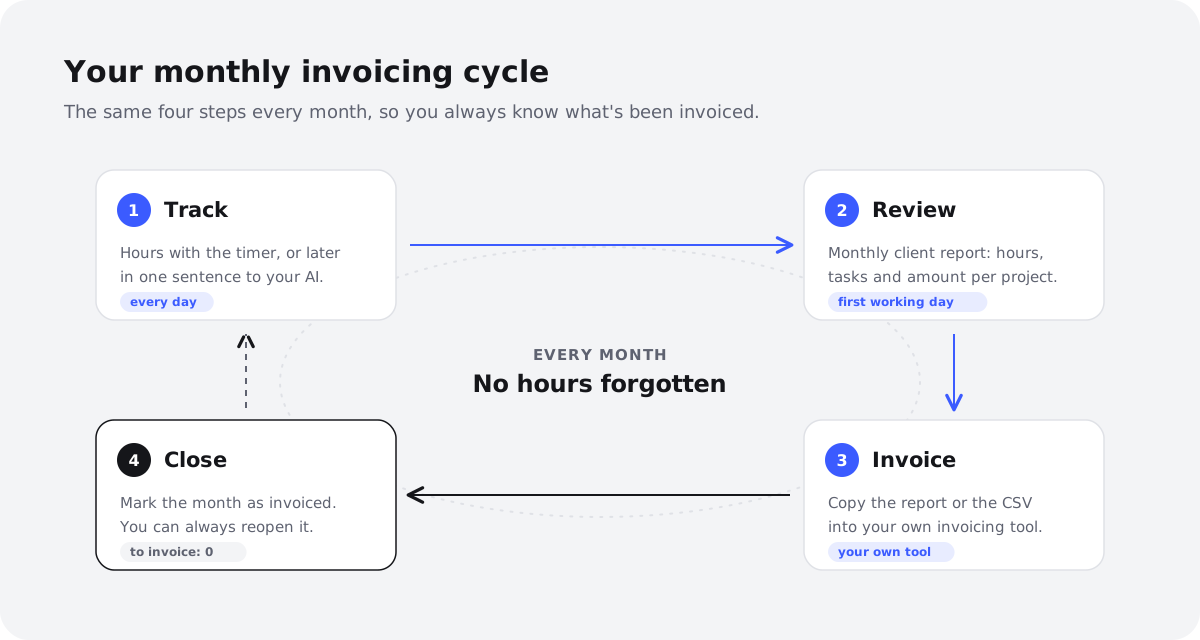
Step 1: Track your time during the month
Record your hours as you go: start a timer when you begin, or log them at the end of each day. Anyone who has to reconstruct a whole month on the last day will forget hours or guess generously. Link every entry to a client and project, with a short description.
Step 2: Review your hours at month-end
Go through the summary client by client. Are any days missing? Are hours logged against the wrong client? Would the descriptions make sense to someone who isn't inside your head? This is also the moment to apply your agreed rounding and check whether you stayed within a project's budget.
Step 3: Prepare the timesheet
Put together the monthly report for each client as described above. Attach it to the invoice, or paste the summary into your email. Some clients like to approve the report before you invoice; agree on that up front.
Step 4: Create the invoice in your invoicing tool
Copy the totals per project into your invoicing or accounting software and send the invoice. Make sure it meets the legal requirements where you work; your accountant can help with that.
Step 5: Close the month as invoiced
Mark the month as invoiced for that client. Next month you'll see straight away what's still outstanding, and the same hours can't end up on two invoices. If you need to correct something later, reopen the month, make the change and close it again.
How does Dowit help with hourly billing?
Dowit is a work planner for freelancers where you track time alongside your tasks, calendar and projects. For invoicing, it handles the preparation. One thing to be clear about: Dowit doesn't create invoices. You make those in your own invoicing tool; Dowit gives you the summary and the amounts.
What Dowit does do:
- Rates per client or per project, in your workspace currency (dollars, pounds, euros and so on).
- Time tracking with a timer on a task, or by adding entries afterwards. You can import hours from Toggl or any other CSV file.
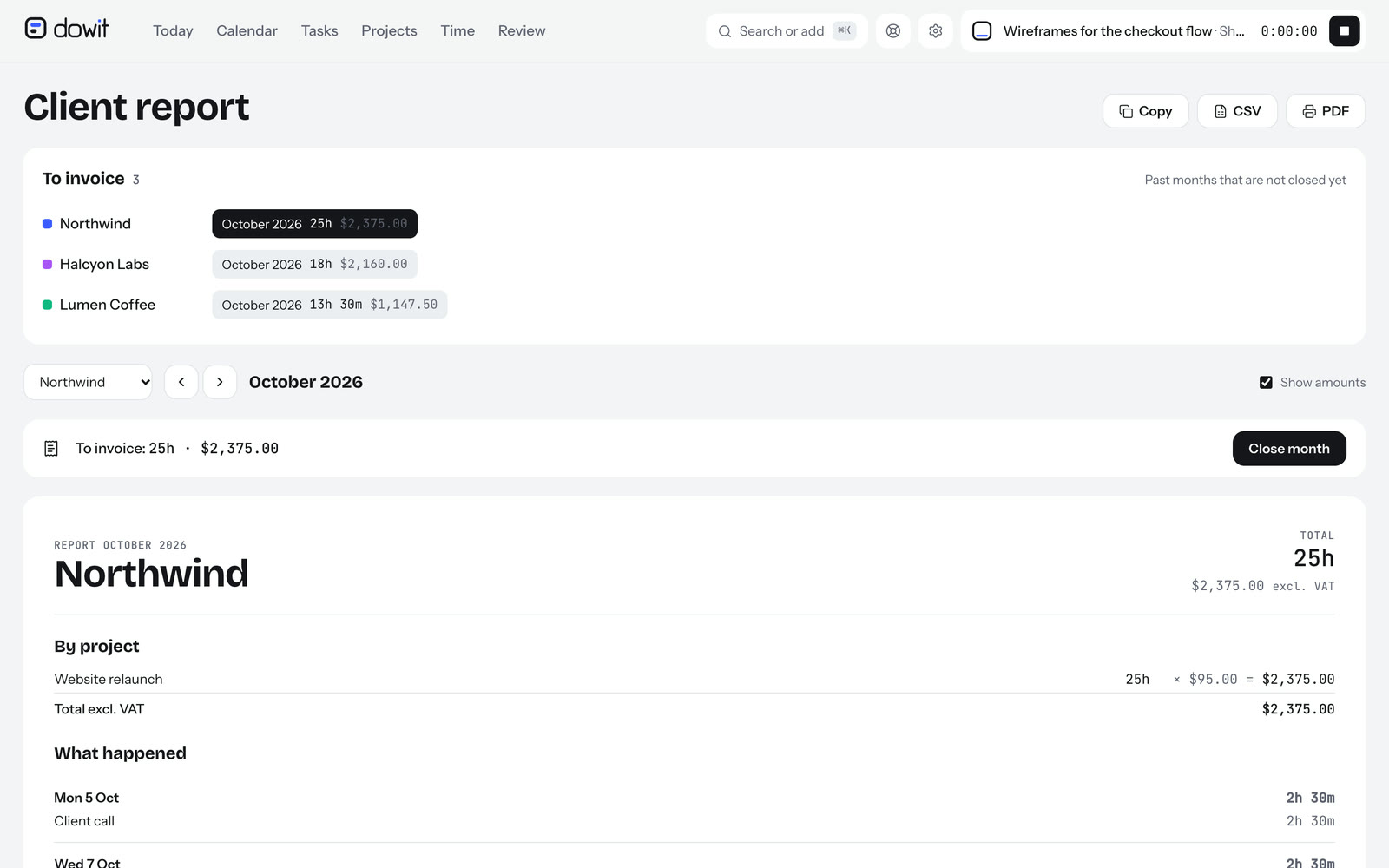
- A monthly client report: hours per project, what you did each day, completed tasks and the amount excluding tax. Copy it as text, print it to PDF, or export it as CSV for any invoicing or accounting software.
- A "To invoice" list showing past months that are still open, per client.
- Closing a month as invoiced, and reopening it if you need to make a change.
Invoicing with your own AI
You can also run Dowit by talking to the AI you already use, Claude or ChatGPT, through a connection (MCP). See Dowit with your AI for how to set it up. For invoicing, it sounds like this:
- "Log 2h Acme website maintenance and 45m Northwind for yesterday."
- "What do I still need to invoice?"
- "Give me Acme's monthly report for October."
- "Close October as invoiced for Acme."
Your AI only sees your own workspace, and you can disconnect it at any time. For more on logging hours through your AI, read how to track time with Claude or ChatGPT. To look back on the month week by week, a weekly review helps.
Dowit is free for individual use, with no time limit. Check pricing if you work as a team.
Frequently asked questions
Should I quote my hourly rate including or excluding tax?
For business clients, rates are usually quoted excluding VAT or sales tax, and you should state that explicitly. Which tax rules apply to you depends on your country and circumstances, so check with your accountant.
How often should I invoice when billing by the hour?
Monthly invoicing is the most common choice for ongoing work: it keeps your cash flow healthy and the amounts manageable. For short jobs you can invoice as soon as the work is done. Agree the frequency with your client in advance.
Can I charge for travel time and meetings?
Yes, as long as you agree it beforehand. Many freelancers count meetings as normal working hours and charge travel at a lower rate or a flat fee. Either way, be transparent about it in your proposal.
What should I do if a client questions my hours?
A detailed timesheet showing what you did each day prevents most questions. If they still come up, go through the days in question together. If you find a mistake, correct it quickly and generously; that builds more trust than arguing over half an hour.
Does Dowit create invoices?
No. Dowit tracks your hours and rates and produces a monthly report with amounts for each client, which you take to your own invoicing tool as text, PDF or CSV. You create and send the invoice itself there.
How often should I review my hourly rate?
Look at your rate at least once a year, and also when your costs rise, you gain experience or you find yourself fully booked. Give existing clients good notice of a change, for example one or two months ahead.