
In short
- Time blocking means giving every task a fixed slot in your calendar, rather than working from a loose to-do list.
- It suits freelancers because client work, calls and admin are otherwise all fighting for the same hours.
- Schedule your fixed appointments first, then your deep work, and only then email, admin and buffers.
- Never book your day to 100%: leave room for the client who needs something now.
- Spend five minutes each evening reviewing the day and move anything unfinished into a new block.
What is time blocking, and why does it suit client work?
Time blocking is a way of planning in which you divide your day into blocks and give each one a clear purpose. Not "work on Acme today", but "09:00 to 11:00: first draft of the Acme proposal". Your to-do list tells you what to do; your calendar tells you when.
For freelancers and small agencies, that difference matters. You're juggling several clients at once, you have calls that can't move, and there's a layer of work nobody sees but that still has to happen: chasing proposals, checking your hours, getting invoices ready. Without a plan, whatever shouts loudest wins, and that's usually your inbox.
A few reasons time blocking works so well for client work:
- You see your real capacity. A list of twenty tasks feels doable until you put them in your calendar and find only five free hours.
- Deep work gets protected. Design, writing and code need long stretches without interruption. A block in your calendar makes that time visible, including to you.
- You can make honest promises. When Sam at Northwind asks whether something can be ready by Thursday, you check your blocks instead of guessing.
- Tracking time gets easier. If you planned what you'd do, there's far less to reconstruct afterwards.
Which types of block do you need?
Not every block is the same. It helps to work with a handful of standard types, each with a typical length, so you don't have to rethink how to spend every hour from scratch.
| Type of block | What it's for | Typical length |
|---|---|---|
| Deep work | Design, code, writing, strategy: work that needs focus | 90 minutes to 2.5 hours |
| Client calls | Check-ins, kick-offs, feedback rounds | 30 to 60 minutes |
| Email and messages | Clearing your inbox, answering quick questions | 20 to 30 minutes, two or three times a day |
| Admin | Checking hours, following up proposals, preparing invoices | 30 to 60 minutes |
| Buffer | Overruns, unexpected requests, small fixes | 15 to 30 minutes between blocks, or one block of an hour |
| Personal | Lunch, a walk, exercise, the school run | Whatever you need, but schedule it |
Personal blocks are the ones people forget. They matter just as much: if lunch isn't in your calendar, someone will book a call over it.
How do you start time blocking? A step-by-step method
You don't need a perfect system. Six steps are enough to start tomorrow.
Step 1: Set your working hours
Decide when your working day starts and ends, say 09:00 to 17:30. It sounds obvious, but without a boundary everything drifts into the evening. Your working hours are the frame your blocks fit into; anything outside it doesn't get planned.
Step 2: List your fixed appointments
Start with whatever won't move: client calls, a weekly team meeting, the dentist. These are usually in your calendar already. Look at what's left over: that's your actual working time.
Step 3: Estimate your tasks
Go through your to-do list and note how long each task will take. Be honest: most of us underestimate, especially with anything new. A useful rule of thumb is to add half again to your first estimate for tasks you haven't done before.
Step 4: Block deep work first
Find the longest free stretches in your calendar and give them to your most important work. For many people that's the morning; for others it's early afternoon. Either way, schedule deep work before email and admin, not in the scraps left between them.
Step 5: Add buffers and admin
Put fifteen minutes of buffer between calls and blocks. Handle email at set times instead of all day long. Give admin its own block, ideally at the end of the day or the week when your energy is lower anyway.
Step 6: Review and adjust daily
Take five minutes at the end of each day. What got done? What slipped? Move unfinished tasks into a new block, not into "someday". Once a week you take a wider look back; that's covered in the guide to the weekly review for freelancers.
What does a time-blocked day look like?
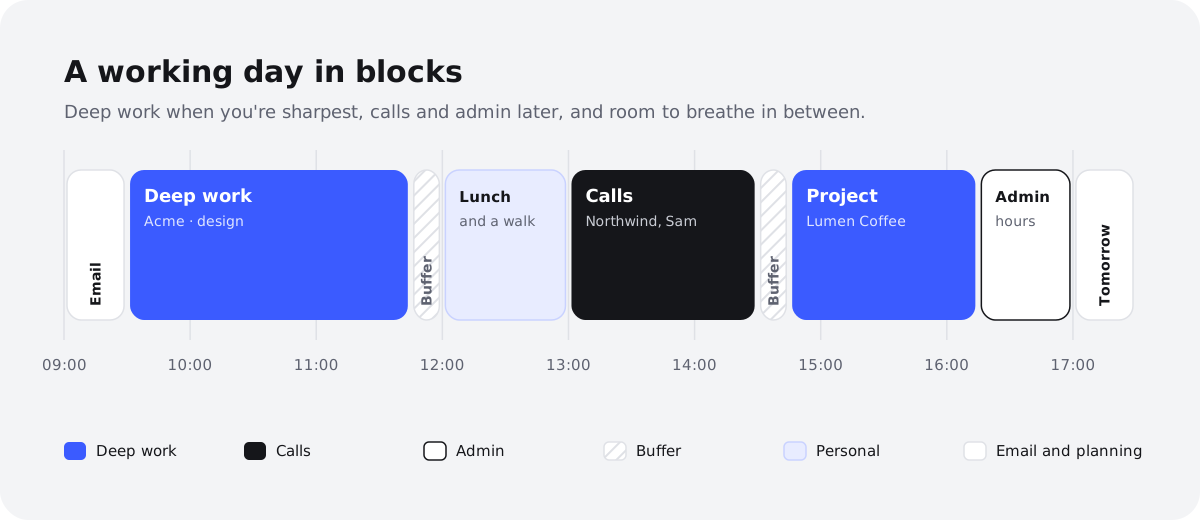
Here's a realistic day for a freelancer working for Acme, Northwind and Lumen Coffee. There are two fixed calls; everything else is planned around them.
| Time | Block | Type |
|---|---|---|
| 09:00 – 09:20 | Email and messages, look over the day | |
| 09:20 – 11:20 | Acme proposal: write the first draft | Deep work |
| 11:20 – 11:35 | Buffer | Buffer |
| 11:35 – 12:30 | Lumen Coffee: work through feedback on the new branding | Deep work |
| 12:30 – 13:15 | Lunch and a short walk | Personal |
| 13:15 – 13:45 | Call with Sam (Northwind) about the schedule | Client call |
| 13:45 – 14:00 | Buffer, write up notes | Buffer |
| 14:00 – 15:30 | Northwind: revise the wireframes | Deep work |
| 15:30 – 15:50 | Email and messages | |
| 15:50 – 16:30 | Call with Halcyon Labs: kick-off | Client call |
| 16:30 – 17:00 | Admin: check hours, follow up a proposal | Admin |
| 17:00 – 17:30 | Buffer and plan for tomorrow | Buffer |
Notice there are just over four hours of deep work here, not eight. That isn't a failure; it's what a realistic day with clients looks like. The buffers absorb overruns, and the last half hour sets up tomorrow.
What do you do when a client interrupts your day?
It happens: at 10:15 Acme rings with an urgent question about a live website. This is where a blocked day pays off, because you can see straight away what has to give.
- Decide whether it's genuinely urgent. If it can wait until your next email block, say you'll reply at 15:30.
- If it is urgent, use your buffer first. Fifteen minutes at 11:20 absorbs a lot.
- If it's bigger, move a whole block. Push the Lumen Coffee block to tomorrow rather than trimming everything a little. Half a block of deep work rarely gives you half the result.
- Log the time. Unplanned work is still billable work. Note it straight away, or you'll have forgotten by Friday.
What are the most common time blocking mistakes?
Most problems with time blocking don't come from the method itself, but from an overly optimistic plan.
Leaving out buffers
Calls overrun, a client emails something urgent, your laptop insists on an update. Without buffers, one delay knocks on to every block after it. Fifteen minutes between blocks feels wasteful until the moment you need it.
Booking your day to 100%
A calendar that's full from 09:00 to 17:30 is a calendar that's already wrong by 11:00. Plan around 70 to 80% of your time and leave the rest open. If you finish early, you've got room for the next thing on your list.
Making blocks too small
Twenty-minute blocks for deep work rarely work. By the time you've settled in, the block is over. Group small tasks into a single admin or email block instead, and give real work at least an hour and a half.
Not adjusting the plan
A time-blocked schedule isn't a contract. If a block falls through, move it and carry on. If you abandon the whole system at the first disruption, you'll be back to a loose to-do list next week.
How can your AI do the blocking for you?
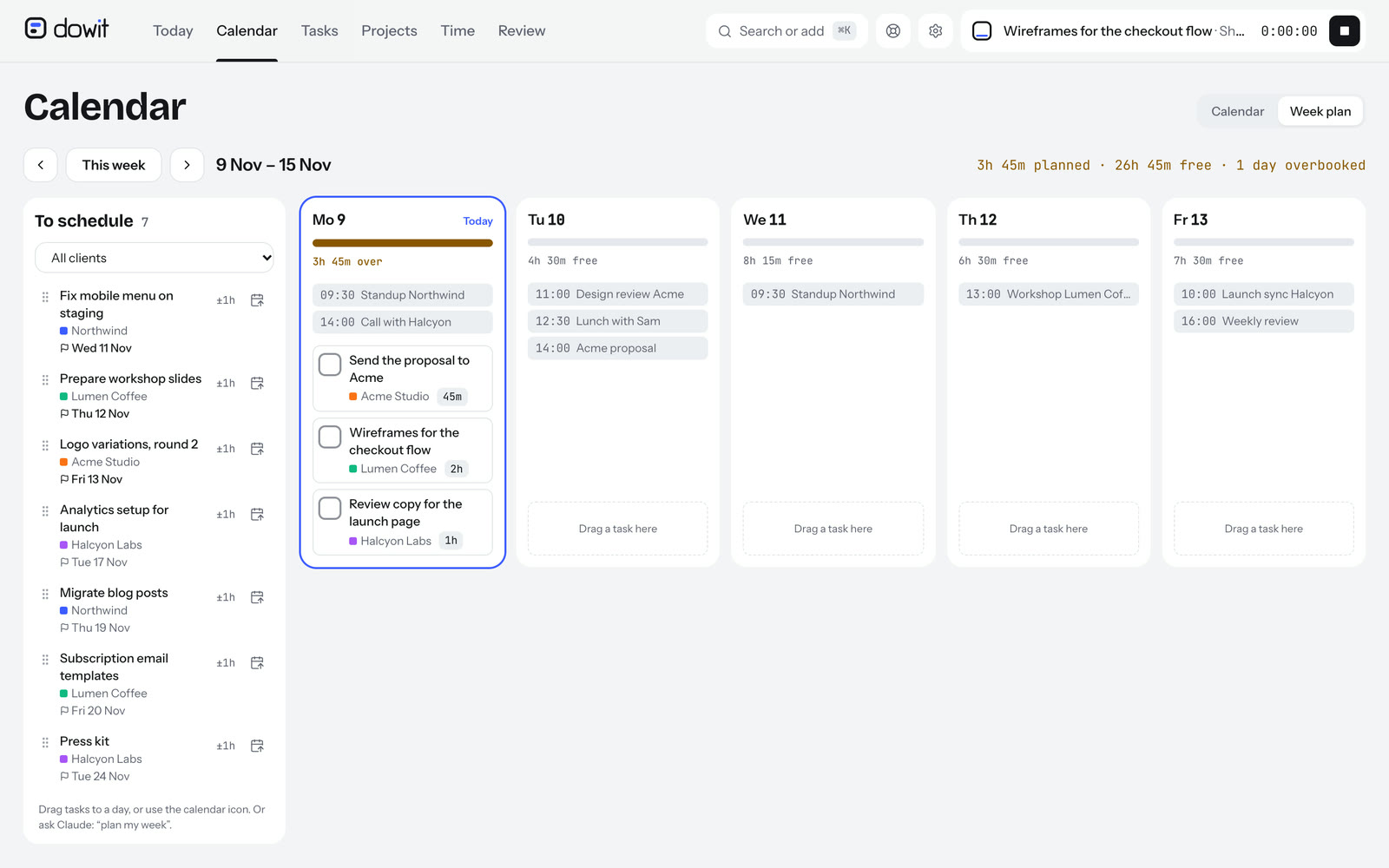
Time blocking takes effort: finding free gaps, dragging blocks around, rescheduling meetings. That's exactly the kind of work you can hand to your AI, provided it can see your calendar and your tasks.
With Dowit, you can do this through Claude or ChatGPT. You connect Dowit once to the AI you already use (we explain how in connect Claude to your calendar) and from then on you plan in plain sentences. Dowit has no built-in AI of its own; it works with your Claude or ChatGPT.
A few examples of what you can ask:
- "Block 2 hours tomorrow for the Acme proposal, between my meetings."
- "Find a free 90-minute slot this week for the Northwind wireframes."
- "What's on my calendar today, and how much free time do I have left?"
- "Move the Halcyon Labs call to Thursday at 10am."
- "Move whatever I didn't finish today to tomorrow."
Your AI only looks for free time within the working hours you've set, so it won't suggest a block at 10pm. Whatever it schedules goes into your calendar as an event.
Calendar and tasks side by side
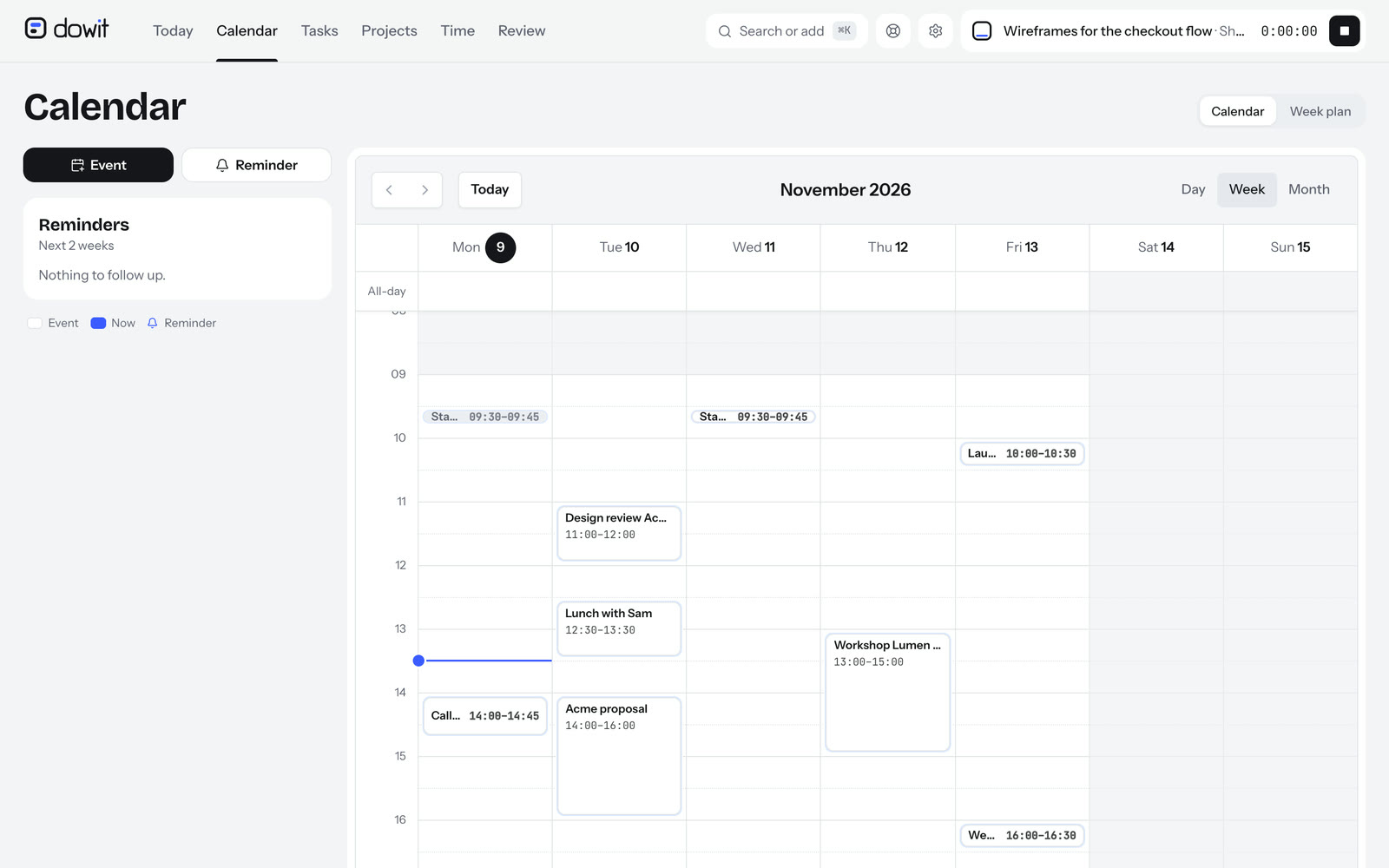
Time blocking works best when you can see your calendar and your task list together. Dowit connects to Google Calendar in both directions: events from your primary Google Calendar sit alongside your tasks, and anything you plan in Dowit shows up in Google Calendar. Dowit doesn't keep a copy of your Google events, and connecting is optional.
The Today screen shows your day as a timeline within your working hours, with your meetings, your focus tasks for today, the task that's currently at the top and how much free time you have left. At a glance, you can tell whether your plan still holds.
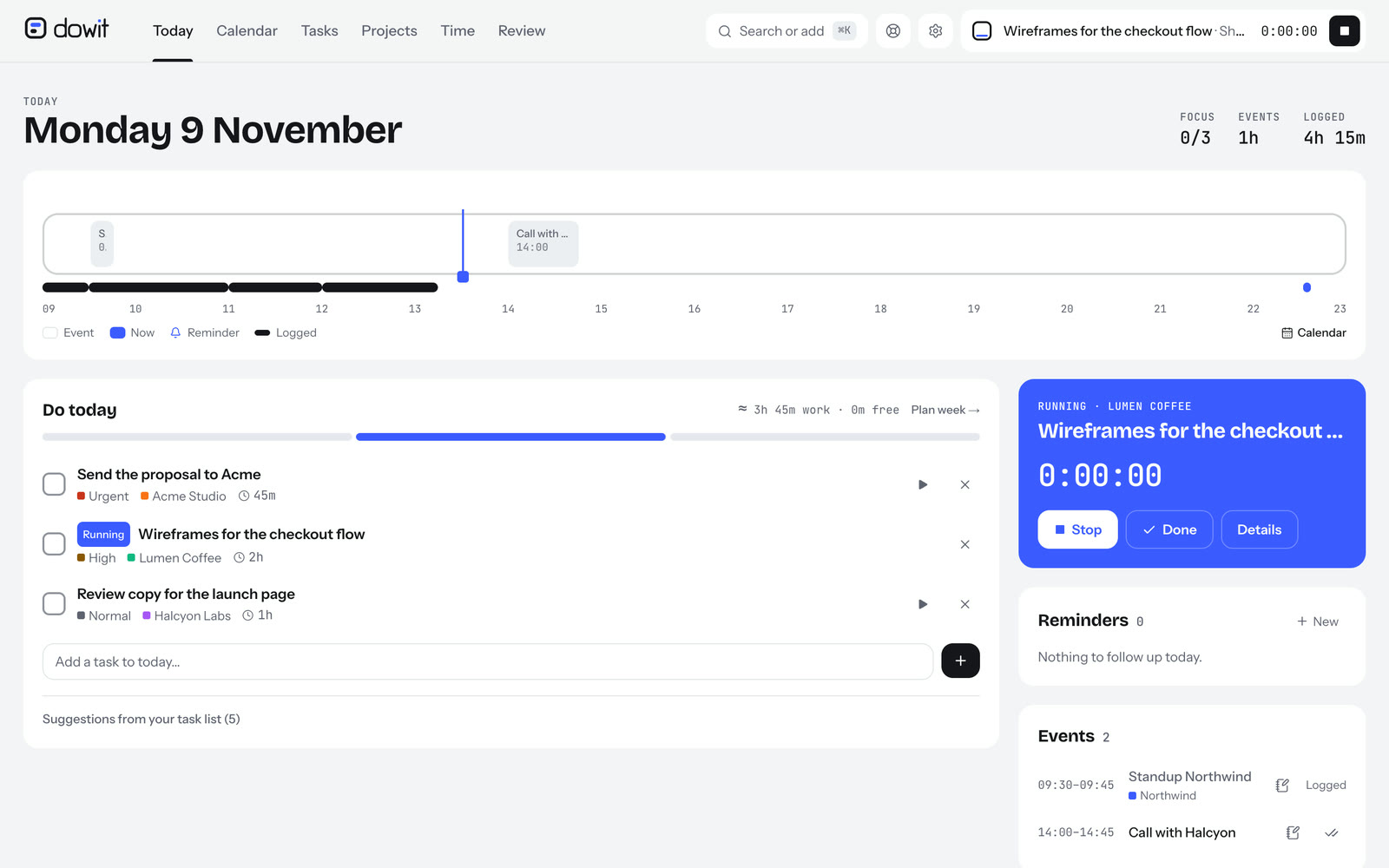
When you start a block, you can put a timer on the task right away. That way your blocks double as your time tracking, which makes billing at the end of the month much simpler. There's more on that side in track time with Claude or ChatGPT. You'll find every feature on /en/features, and how the AI connection works on /en/ai.
Frequently asked questions
What's the difference between time blocking and a to-do list?
A to-do list tells you what to do; time blocking tells you when. Each task gets a slot in your calendar. That shows you immediately whether your plan is realistic, which a list on its own never will.
How long should a time block be?
It depends on the kind of work. For deep work, 90 minutes to 2.5 hours works well; email and admin fit into blocks of 20 to 60 minutes. Blocks under half an hour rarely get much focused work done.
How much of my day should I schedule?
Aim to schedule around 70 to 80% of your working hours and keep the rest free as buffer. As a freelancer, unexpected client requests are almost guaranteed. A day that's fully booked tends to go off the rails early.
Does time blocking work if clients interrupt me a lot?
Yes, arguably even better. Because you can see what's planned, you can choose deliberately what to move rather than squeezing everything a bit. Keep buffers free, and for bigger disruptions move a whole block.
Can my AI time block my calendar for me?
If you connect Dowit to Claude or ChatGPT, you can ask it to find free time and schedule blocks, for example "find a free 90-minute slot this week". Your AI searches within your working hours and adds the block to your calendar. With Google Calendar connected, it appears there too.
Is Dowit free for time blocking?
Yes, Dowit is free for individual use, with no time limit. If you work as a team, you'll need the Business plan. Details are on /en/pricing.