
In short
- A weekly review is a fixed slot of about 20 minutes where you wrap up the week and set up the next one.
- For freelancers it comes down to three things: never losing billable hours, never missing a deadline, and never promising more than you can deliver.
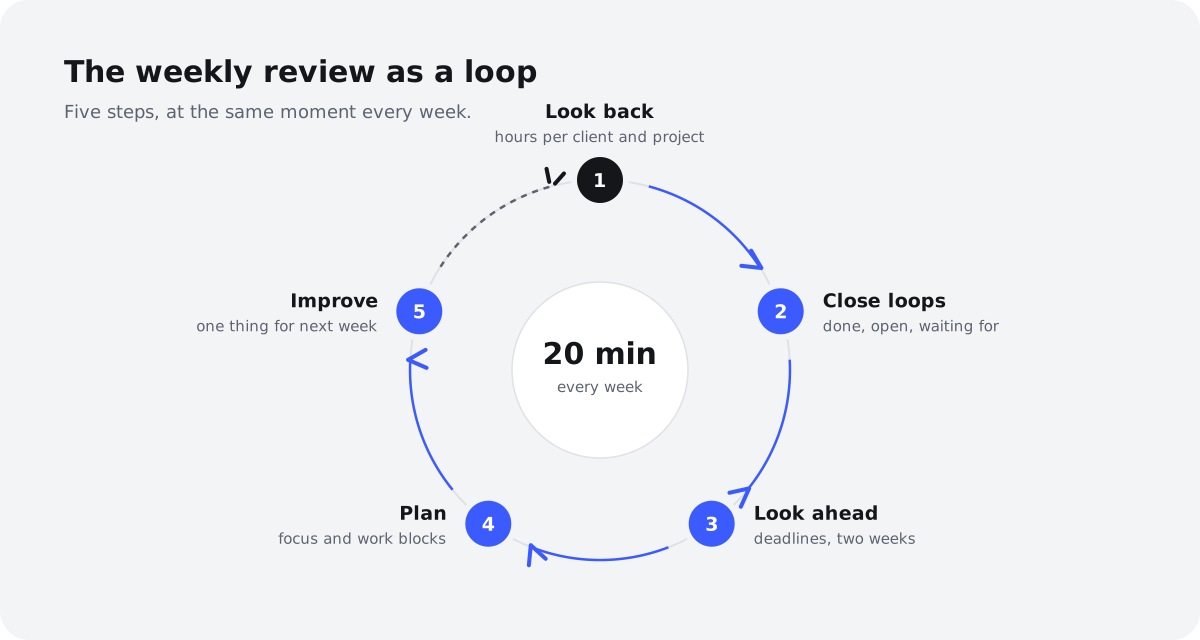
- The routine has five steps: check your hours, close loops, scan deadlines, plan next week and pick one improvement.
- Friday afternoon and Monday morning both work; choose one and stick to it.
- Below you'll find a printable checklist and a set of questions to ask yourself.
Why do freelancers need a weekly review?
As a freelancer you're the one doing the work, the one managing the project and the one keeping the books. During the week the first role takes over and the other two drift. A weekly review is when you step back and pick them up again.
With client work, it pays off in three ways:
- You catch hours that were never logged or billed. That twenty-minute call with Northwind or the quick fix for Lumen Coffee is still fresh on Friday. A month later it's gone, and you've worked for free.
- You see deadlines coming. A deadline you spot two weeks out is a planning question. A deadline you discover on the day is a late night.
- You notice overcommitment in time. If next week is already packed with meetings and you've still promised three new things, you'll see it now rather than on Wednesday evening.
When and where should you do your weekly review?
There's no perfect time, only one that suits you. Most freelancers choose between Friday afternoon and Monday morning.
| When | Pros | Cons |
|---|---|---|
| Friday afternoon | Everything is still fresh; you properly close the week and start the weekend with a clear head | Energy is low and it's tempting to skip it |
| Monday morning | You're rested and plan with fresh energy; you immediately see what came in over the weekend | Last week's details are hazier; reconstructing hours is harder |
A good compromise is to split it: do the look back (steps 1 and 2) at 4pm on Friday and the look ahead (steps 3 to 5) at 8:30 on Monday. Your memory is fresh for the hours and your mind is fresh for the planning.
Put it in your calendar as a recurring appointment with yourself. A review that has to happen "sometime this week" rarely does.
How do you do a weekly review in 20 minutes?
Here's the routine in five steps. The timings are a guide; the first time will take a little longer, but after a few weeks it becomes second nature.
| Step | What you do | Time |
|---|---|---|
| 1 | Review hours per client and project | 5 min |
| 2 | Close loops: done, open, waiting for | 5 min |
| 3 | Deadlines and reminders for the next two weeks | 3 min |
| 4 | Plan next week's focus and work blocks | 5 min |
| 5 | One improvement for next week | 2 min |
| Total | 20 min |
Step 1: Look back at your hours per client and project
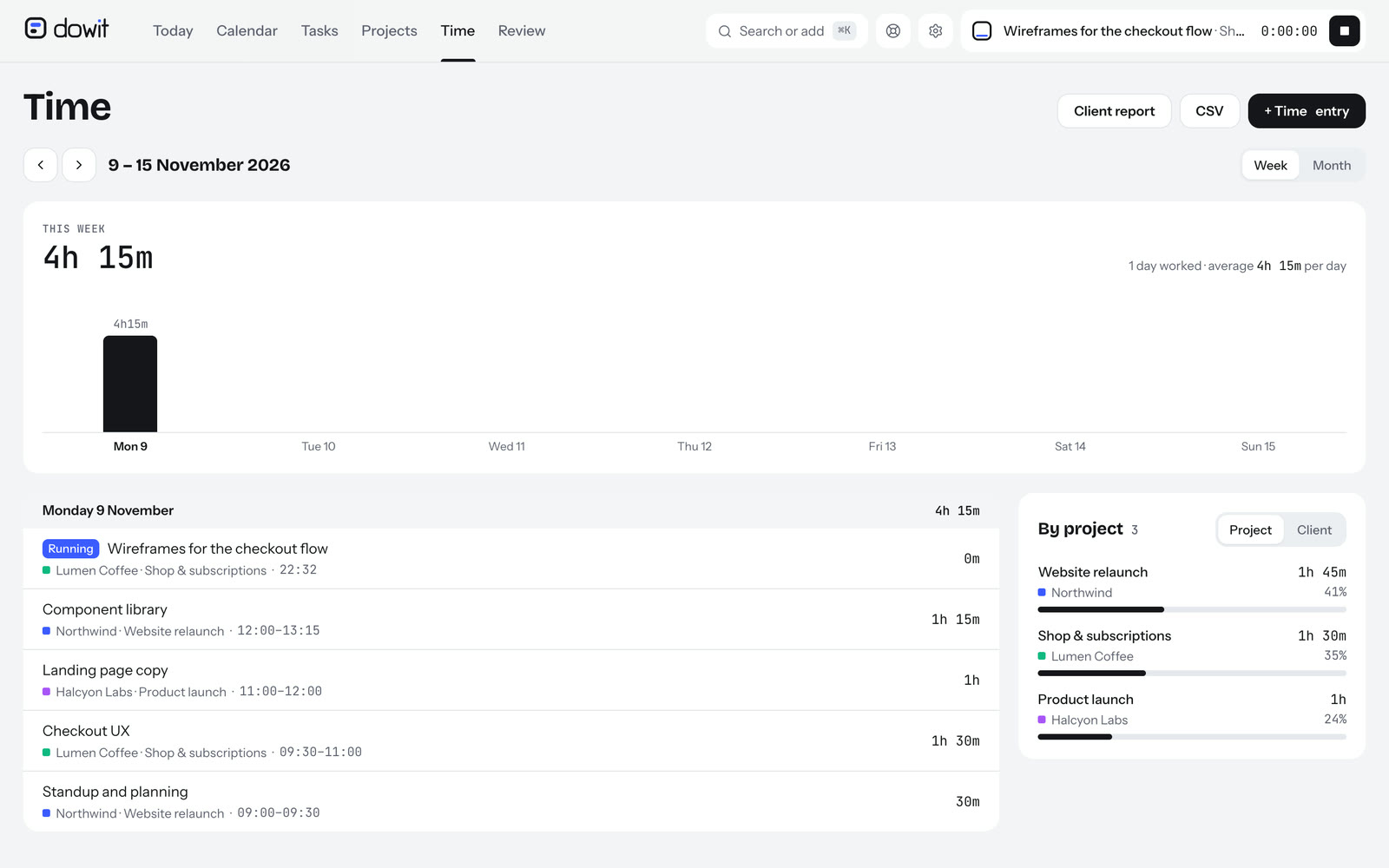
Open this week's timesheet and go through it day by day. Does it match what you actually did? Look for gaps in particular: an afternoon with nothing logged is rarely an afternoon with no work.
Fill in missing hours straight away, while you still remember. Then look per client: how much time went to Acme, how much to Halcyon Labs? If a project has a budget in hours, compare what's been used with what's left. If a project is running over, you want to know now, not when you send the final bill.
Step 2: Close loops: done, open, waiting for
Go through your task list and put each task into one of three buckets:
- Done: tick it off. Include the small things you did but never wrote down.
- Open: is it still on your list with a realistic date? If not, give it one or consciously drop it.
- Waiting for: you're waiting on feedback, a file or sign-off from someone else. Note who and since when, and set a reminder to follow up.
Step 3: Check deadlines and reminders for the next two weeks
Look two weeks ahead, not one. A deadline next Friday often needs preparation this week. For each deadline, note what still needs doing and roughly how long it will take.
Go through your reminders as well: invoices to send, quotes about to expire, a client you promised to call back. If the end of the month is close, book a slot now to review your hours per client and invoice them (more on that in the guide how to bill by the hour).
Step 4: Plan next week's focus and work blocks
Start with what's fixed: appointments, calls, meetings. That's the skeleton of your week. Then see how much time is genuinely left for work.
Choose one to three focus tasks per day: the things that must get done that day, whatever happens. Block time for them in your calendar, ideally when you have few meetings. Leave deliberate room for the unexpected; a week planned to the last minute is guaranteed to overrun. For more on working in blocks, see time blocking for freelancers.
If it doesn't fit, this is the moment to move things, postpone them or tell a client something will be a day late. That conversation is much easier on Monday than on Thursday.
Step 5: Pick one improvement for next week
Finish with a single question: what would make next week slightly better? One thing, not five. For example: "I'll start the timer at the start of every call", "No meetings before 10am" or "I'll send Northwind an update on Wednesday rather than Friday".
Write it somewhere you'll see on Monday. Next week, take a moment to check: did it work?
What questions should you ask yourself in a weekly review?
Questions help you look beyond your lists.
| Topic | Question |
|---|---|
| Hours | Have I logged all the hours I worked, including short calls and emails? |
| Budget | Which project is close to or over its hours budget? |
| Clients | Which client am I waiting on, and for how long? |
| Deadlines | Which deadline in the next two weeks needs work this week? |
| Capacity | Have I promised more next week than fits into my working hours? |
| Money | Which hours from last month do I still need to invoice? |
| Improvement | What went wrong this week that I can prevent next week? |
Checklist: your printable weekly review
Print this list or add it as a recurring task in your planner. Tick it off every week.
- Calendar, task list and timesheet open; notifications off
- This week's hours checked day by day and gaps filled
- Hours per client and project compared with budget
- Completed tasks ticked off
- Open tasks given a realistic date or consciously dropped
- "Waiting for" items noted, with a follow-up reminder
- Promises from emails and notes turned into tasks
- Deadlines for the next two weeks reviewed
- Reminders checked (invoices, quotes, call-backs)
- Next week's fixed appointments reviewed
- One to three focus tasks chosen per day
- Work blocks scheduled, with room for the unexpected
- One improvement for next week written down
How do you run your weekly review with your AI and Dowit?
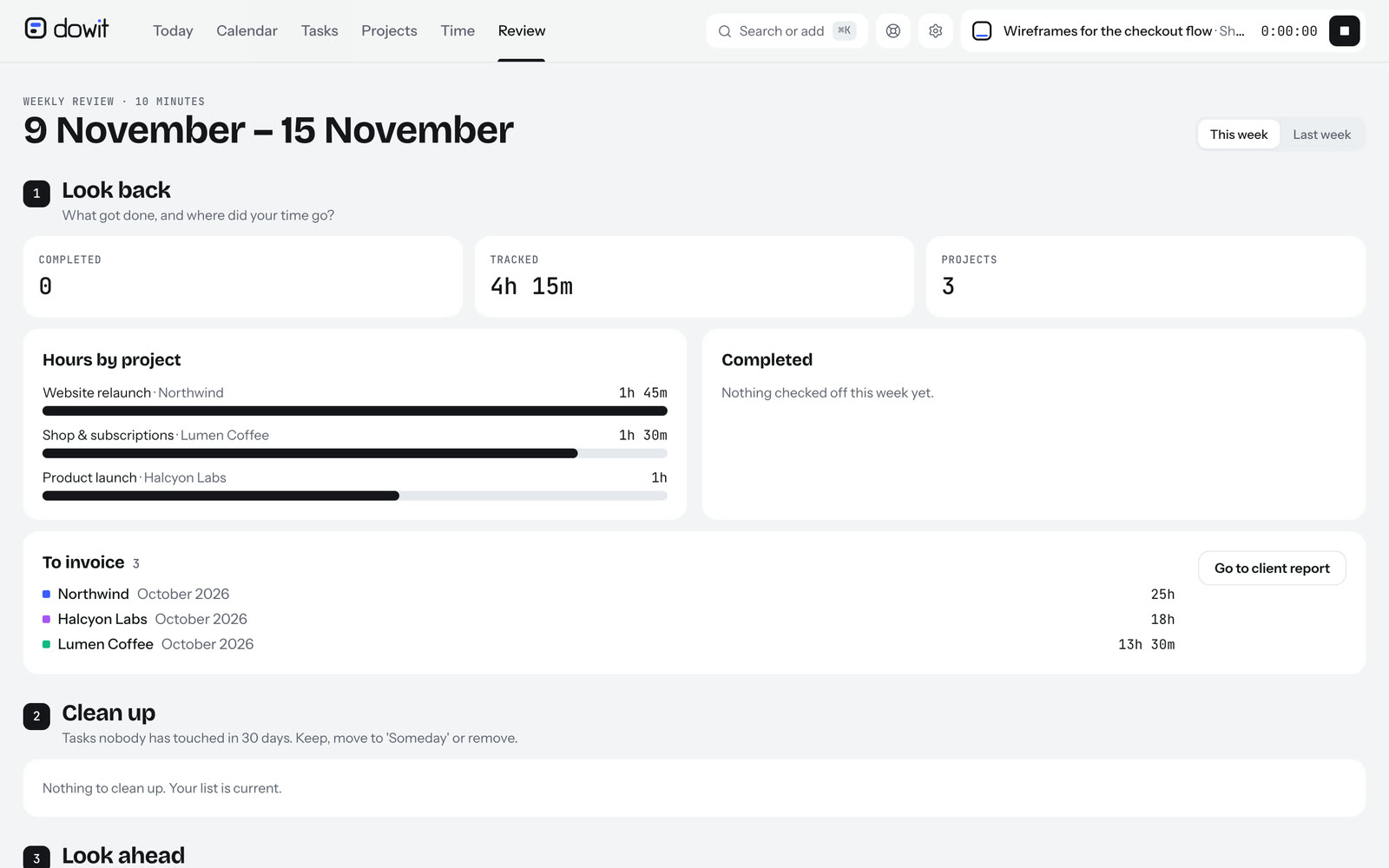
You can do the whole routine on paper. But most of steps 1 to 4 is looking things up and moving things around, and an assistant can do that faster. In Dowit your calendar, tasks, projects and hours live in one place, and the Review page shows your week at a glance: hours per client and project, what you finished and what's still open.
If you've connected Claude or ChatGPT to Dowit (via MCP, see Dowit with your AI), you can also run the review as a conversation. For example:
- Step 1: "How did my week go? Where did my time go?" Your AI pulls up the weekly review and summarises your hours per client and project. If something's missing, just say: "Log another 30m Northwind for Tuesday's call."
- Step 2: "Which tasks are still open for Acme?" followed by "Mark the 'logo variations' task as done."
- Step 3: "What deadlines and reminders do I have in the next two weeks?" or "Remind me on Thursday at 10am to follow up with Sam."
- Step 4: "Plan next week's focus tasks around my meetings." Your AI looks at your week plan and finds free time within your working hours. Any events it schedules also appear in Google Calendar if you've connected it.
- Wrapping up: "Move what I didn't finish to Monday."
At the end of the month you can also ask: "What do I still need to invoice?" Dowit gives you the hours and amount per client and month. You then create the invoice in your own invoicing software; Dowit doesn't create invoices. To see exactly how logging hours with your AI works, read track time with Claude or ChatGPT.
Step 5, the improvement, stays with you. Your AI can show you the numbers, but deciding what to do differently is your call.
Which pitfalls make a weekly review pointless?
- Making it too long. You won't keep up a ninety-minute review for a month. Keep it to 20 minutes; if it takes longer, that's usually a sign you're not capturing enough during the week.
- Only looking back. A list of what went wrong with no plan for next week isn't a review, it's a moan. Steps 3 and 4 are where most of the value is.
- Filling every slot. Planning every free minute feels productive but leaves no room for the client request that always turns up. Keep a buffer each day.
- Adding hours "later". Later never comes. Fill in missing hours in step 1, even if it's an estimate.
- Skipping it in busy weeks. That's exactly when you need it most. If you're swamped, do just steps 1 and 3: hours and deadlines.
- Five improvements at once. Then nothing changes. One a week is enough.
Frequently asked questions
What is a weekly review?
A weekly review is a short, fixed moment each week where you look back at what you did and ahead at what's coming. For freelancers it's mainly about hours, open tasks, deadlines and planning the following week. With a set routine it takes around 20 minutes.
How long should a weekly review take?
Allow about 20 minutes. The first few times will take longer, because you'll be looking things up and tidying as you go. Once you're tracking hours and tasks during the week, it gets quick.
Is Friday or Monday better for a weekly review?
Friday is better for looking back, because everything is still fresh. Monday is better for planning ahead, because you're rested and can see what's come in. You can also split it: review on Friday, plan on Monday.
What's the difference between a weekly review and a weekly plan?
The weekly review looks back and tidies up: hours, finished and open tasks. The weekly plan looks forward: which focus tasks you'll do when, around your fixed appointments. In the routine above, planning is step 4, the natural follow-on from the review.
Do I need a special tool for a weekly review?
No. A calendar, a task list and an overview of your hours are enough, even on paper. A planner that brings those three together, such as Dowit (free for individuals), saves you searching, and with a connected AI you can do the review as a conversation.
Can my AI do the weekly review for me?
Your AI can do the legwork: summarise your hours per client, show open tasks and deadlines, plan focus tasks around your meetings and move unfinished tasks on. The decisions are yours: what gets priority, what you drop and what you want to do better next week.